How to Design a Menu That Drives Orders
Key Takeaway
Menu design tips that lift orders: photo strategy (DoorDash: up to 44% more sales), pricing psychology, item naming, featured-item placement. 2026 guide.
TL;DR: Quick Answer
A well-designed digital menu can lift average order value through proven menu engineering tactics. The biggest wins: add high-quality photos to your top 10 sellers (DoorDash data shows menus with item photos get up to 44% more monthly sales), use the ‘decoy’ pricing strategy (anchor with one premium item to make mid-range options feel reasonable), place high-margin items in the first 2-3 positions of each category, where attention concentrates, and write item names that emphasize provenance (‘free-range chicken’ outperforms ‘chicken’). Group items into 5-7 short categories rather than one long list, because long scrolling lists cause decision fatigue. Use dietary tags (Vegan, Halal, Gluten-Free, Spicy) to help special-diet customers find their fit in seconds. Test your menu on a phone, in good and dim lighting, before publishing. The impact compounds. For example, a $2 lift on average check across 100 covers a day adds $73,000 over a 365-day year.
Your digital menu isn't just a list of dishes and prices. It's your most powerful sales tool. Every font choice, photo placement, category name, and price format influences what customers order and how much they spend.
The difference between a mediocre digital menu and a well-designed one shows up in the research: DoorDash found menus with item photos get up to 44% more monthly sales, and a Cornell University study found descriptive item names lifted sales by 27%. That's not a marginal improvement. For a restaurant doing $500,000/year in revenue, it's the difference between surviving and thriving.
This guide covers the research-backed design principles that actually move the needle: food photography, item naming, pricing psychology, category structure, and mobile-specific layout rules. Where a recommendation rests on published research, we link the source.
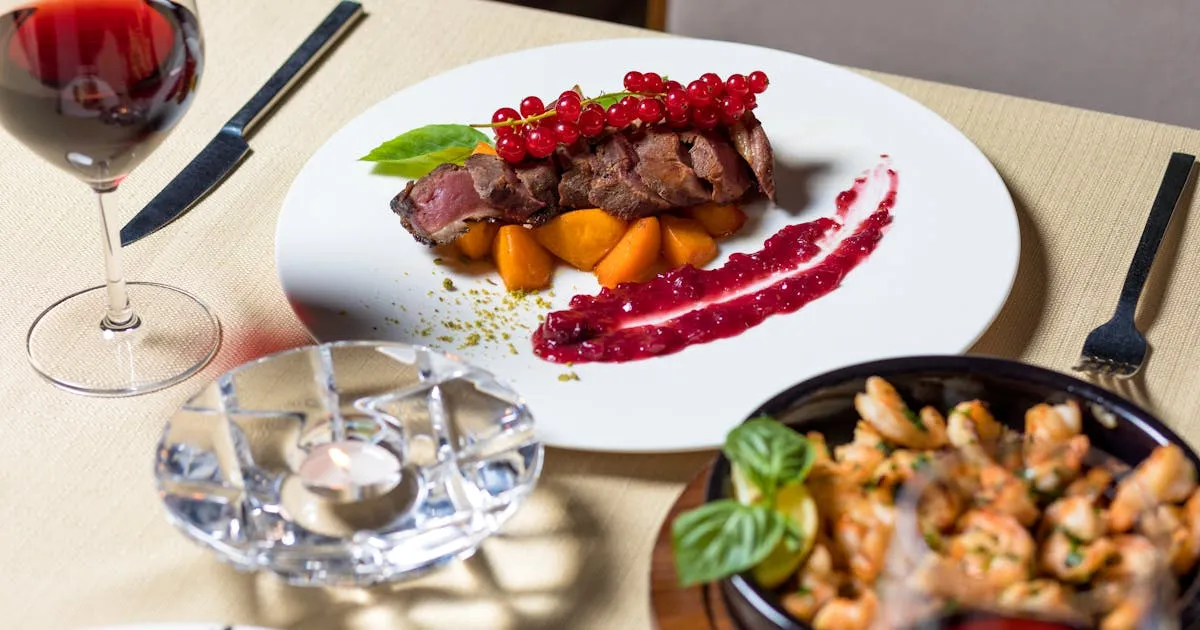
If you only change one thing about your digital menu, add photos. The data is overwhelming:
- DoorDash studied 15,000+ small restaurant merchants and found that menus with item photos generate up to 44% more monthly sales
- Grubhub reports restaurants that add pictures and descriptions receive as much as 70% more orders
- Deliveroo says sites with menu photos can boost orders by 25%
This is the biggest advantage digital menus have over paper menus. A printed menu can fit maybe 3-5 photos without looking cluttered. A digital menu can show a photo for every single item, and each photo is optimized for the customer's screen.
Photo Tips That Work
- Start with your top 10 sellers: you don't need to photograph everything on day one
- Use natural lighting: smartphone photos in natural light outperform dark, flash-lit images
- Show the dish from above or at a 45° angle: these are the two most appetizing perspectives
- Keep backgrounds simple: the food should be the focus, not the table setting
- Match reality: over-styled photos that don't match the actual dish hurt trust and increase complaints
Don't have a digital menu yet? Our step-by-step guide to creating a digital menu will get you started.
What you call a dish matters as much as what's in it. A landmark study by Wansink, Painter, and Van Ittersum at Cornell University tested the effect of descriptive menu labels in a six-week field study with 140 customers.
The result: items with descriptive labels had 27% higher sales than identical items with plain labels. Customers also rated the food as higher quality, better value, and said they were more likely to return.
Plain vs. Descriptive Names
Descriptive Names That Sell: The 27% Effect
| Plain Name | Descriptive Name | Category |
|---|---|---|
| Grilled Chicken | Herb-Crusted Grilled Chicken | Sensory |
| Pasta | Tuscan Sun-Dried Tomato Pasta | Geographic |
| Chocolate Cake | Grandma's Triple-Layer Chocolate Cake | Affective |
| House Salad | Crisp Garden Salad with Lemon Vinaigrette | Sensory |
The three most effective description types are:
- Sensory labels (texture and taste words): tender, crispy, satin, smoky, zesty
- Geographic labels (origin references): Tuscan, Cajun, Thai-style, Mediterranean
- Affective labels (emotional connections): home-style, grandma's, chef's favorite
We suggest keeping descriptions to 15-25 words per item: enough to entice, short enough to scan on a phone.
How you display prices affects how much customers spend, even if the actual prices don't change.
Remove the Dollar Sign: +8% Spend
A Cornell study by Yang, Kimes, and Sessarego, run at a café at the Culinary Institute of America, tested three price formats: "$20" vs "20" vs "twenty dollars." Diners who saw prices without dollar signs spent an average of $5.55 more (about 8%). The dollar sign triggers the psychological "pain of paying", and removing it reduces that friction.
On a digital menu this depends on your platform's price formatting. Where you can set it, display "12" or "12.00" instead of "$12.00": the customer still understands it's the price.
Use Price Anchoring
Place your highest-priced item at the top of each category. This makes everything below it feel more reasonable, a well-documented cognitive bias called anchoring.
Don't Align Prices in a Column
When prices are right-aligned in a neat column, customers' eyes jump straight to the prices and comparison-shop. Instead, place the price at the end of the item description, separated by a few dots or spaces. This forces the customer to read the description first, and by the time they reach the price, they're already engaged with the dish.
Avoid Price Trails
The dotted lines connecting dish names to prices ("Burger .............. $12") are a paper menu convention that screams "we're trying to get you to spend." On a digital menu, there's no need for them. Price comes naturally after the description.
How many categories should your menu have? How many items per category? Research points to a clear sweet spot.
5-7 Main Categories
Behavioral economics research based on Hick's Law (decision time increases logarithmically with the number of choices) and Barry Schwartz's Paradox of Choice (too many options reduce satisfaction) points to 5-7 main categories as optimal. According to ChowNow's menu optimization guide, this provides variety without overwhelming customers.
Typical structure: Appetizers, Mains, Sides, Desserts, Drinks. Add 1-2 more if you have distinct meal types (Breakfast, Lunch) or specialty categories (Chef's Specials, Kids Menu).
5-7 Items Per Category
The same research applies within categories. Qamarero's menu guide recommends 5-7 items per category. Beyond that, decision quality drops and customers default to familiar safe choices instead of exploring high-margin items.
Put Your Stars First
According to Nielsen Norman Group's scroll research, users spend 57% of their page-viewing time above the fold and 74% in the first two screenfuls. That study used desktop screens, but the lesson carries over to a mobile menu: your highest-margin, most popular items should be in the first 2-3 positions of each category, where attention concentrates.
A well-engineered menu structure can improve profit margins without adding a single new dish.
Nearly every QR code menu scan happens on a phone. Your menu must be designed for mobile first, desktop second. Here are the specific technical rules:
Tap Targets: 44px Minimum
Apple's Human Interface Guidelines recommend interactive elements of at least 44×44 points (44 CSS pixels on a web page). Google's Material Design recommends touch targets of at least 48×48 dp, separated by 8dp of space or more. If your menu items are smaller than this, customers will misclick, get frustrated, and stop browsing.
Font Size: 16px Minimum
Body text below 16px is hard to read on a phone and pushes customers to zoom in. Item names should be 16-18px, descriptions 14-16px, and prices should match the item name size. Use sans-serif fonts (Open Sans, Roboto, Lato): Terraslate's menu font guide notes that sans-serif fonts offer excellent readability.
Contrast: 4.5:1 Ratio
WCAG accessibility standards require a 4.5:1 contrast ratio for body text (WCAG 1.4.3, Level AA). Low-contrast menus (light gray text on white) may look sleek on a designer's monitor but are unreadable in a brightly-lit restaurant. Dark text on a light background is the safest choice. For a deeper look at why this matters, read our analysis of QR code menus vs PDF menus and their accessibility differences.
Color: Use Warm Tones Strategically
Research by Satyendra Singh at the University of Winnipeg found that people make up their minds within 90 seconds of initial interaction, with 62-90% of that assessment based on color alone. Red stimulates appetite and encourages faster decisions. Orange and yellow also drive hunger. Use warm accent colors for category headers, highlights, and call-to-action buttons, but keep the base palette clean and readable.
Load Speed: Keep It Light
Google's research on mobile page speed found bounce probability rises 32% as load time goes from 1 to 3 seconds (Think with Google). As a target, aim to compress food photos to WebP format, keep the total page under 500 KB, and avoid heavy animations. Customers standing at a table with their phone out have little patience for a slow page. For context on why speed matters so much, see our complete guide to digital menus.
Menu design isn't a one-time project: it's an ongoing optimization. The restaurants that see the biggest revenue increases treat their digital menu the same way e-commerce companies treat their product pages: test, measure, refine.
Start with the highest-impact changes first:
- Add food photos to your top 10 items (up to 44% more monthly sales in DoorDash's data)
- Rewrite item names with descriptive language (+27% sales per item)
- Remove dollar signs from prices where your platform allows it (about 8% more spend in Cornell's study)
- Restructure categories to put Stars first
These four changes can lift revenue with zero increase in food costs, labor, or rent.
If you don't have a digital menu yet, create your free menu on Menujo and apply these principles from day one. For the full cost comparison, see how much menu printing really costs.
Where to Put Your Menu
Once your menu is built, distribute it across the channels your customers actually use. The same QR-coded URL works everywhere (Instagram bio, Google Business Profile, WhatsApp Business, takeout bags, table tents), but each channel has its own setup quirks worth getting right.
- Menu distribution channel guides: overview of every channel and the workflow for each
- Restaurant menu on Instagram bio: Instagram's native 5-link feature plus prompt copy that lifts taps
- Menu on Google Business Profile: add the menu URL to your GBP listing for local-search discovery
- Restaurant menu on WhatsApp: click-to-chat menu sharing for markets where WhatsApp is the primary discovery channel
Related Guides
More resources for setting up and running a digital menu:
- Restaurant-type guides: setup playbooks for cafés, food trucks, bars, fine-dining, hotels, breweries, juice bars, pizzerias, and more.
- Digital menu for cafés: daily pastry rotation, milk-alternative tags, espresso variants, photo specs.
- Digital menu for food trucks: daily specials and availability toggles, weatherproof QR placement, weak-signal handling at festivals.
- Restaurant + menu glossary: definitions covering menu engineering, QR-code mechanics, hospitality compliance basics.
- Free QR code generator: make a custom QR for any menu URL, SVG and PNG output, color customization, no signup required.
Key Takeaways
- Add photos to your top 10 sellers: DoorDash data shows menus with item photos get up to 44% more monthly sales.
- Use decoy pricing: anchor with one premium item so mid-range options feel reasonable.
- Place high-margin items in the first 2-3 positions of each category, where attention concentrates.
- Write item names that emphasize provenance (‘free-range chicken’ beats ‘chicken’).
- Group menu into 5-7 short categories: long scrolling lists cause decision fatigue.
- Use dietary tags (Vegan, Halal, Gluten-Free, Spicy) for special-diet discoverability.
- Example: a $2 lift on average check across 100 covers a day adds $73,000 over a 365-day year.