If you're still using printed menus, you're spending money every time a price changes, a dish sells out, or a seasonal item rotates in. The average restaurant spends $2,400 to $4,800 per year on menu printing alone, according to Terraslate's cost analysis.
A digital menu solves this. It's an online version of your restaurant menu that customers access by scanning a QR code or tapping a link — no app download needed. You can update prices, add photos, mark items as sold out, and change your entire menu in seconds, from your phone.
In this guide, you'll learn exactly how to create a digital menu for your restaurant for free, what to include, how much it costs compared to printed menus, and the mistakes to avoid. Whether you run a fine dining restaurant, a café, a food truck, or a hotel, this guide covers everything you need.
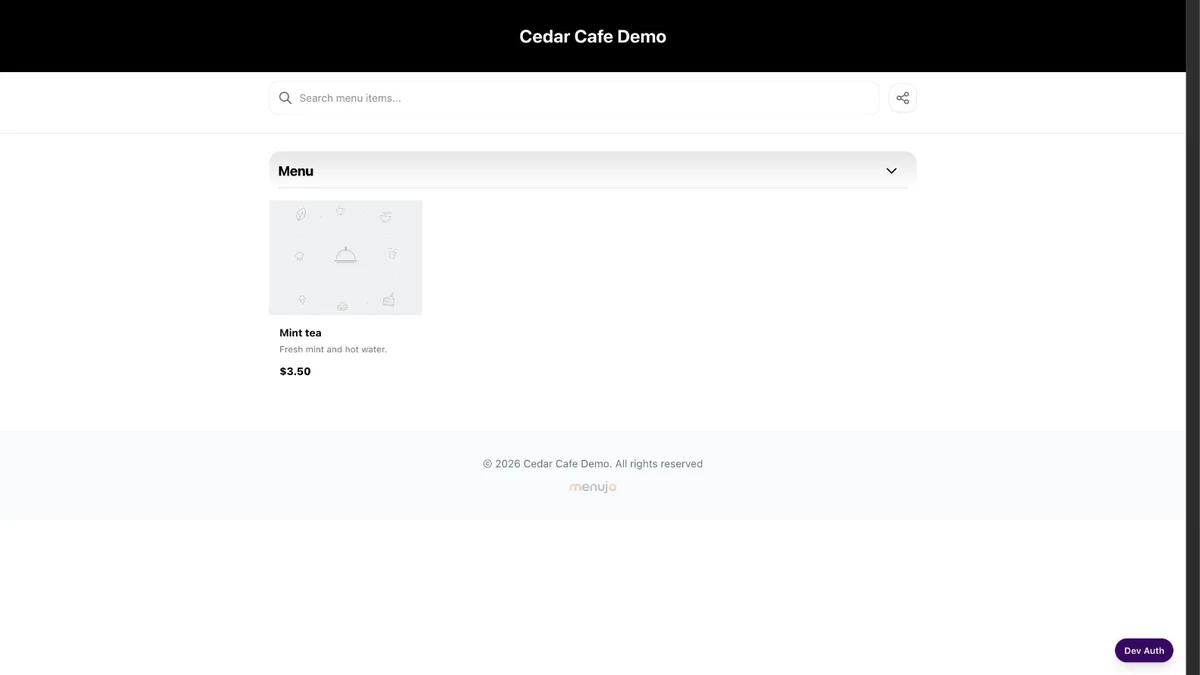
A digital menu is an electronic version of your restaurant's menu that customers view on their smartphone, tablet, or any web browser. Instead of handing out physical menus, you place a QR code on each table. Customers scan it with their phone camera, and your full menu opens instantly in their browser.
Digital menus typically include:
- Menu items organized by category (appetizers, mains, desserts, drinks)
- Prices with optional size variants (small, medium, large)
- Descriptions and high-quality food photos
- Dietary tags like Vegan, Halal, Gluten-Free, or Spicy
- Restaurant info — address, phone, WiFi password, social media links
Unlike digital menu boards (TV screens mounted on walls), a QR code digital menu requires zero hardware. Your customers use their own phones, which means there's nothing to buy, install, or maintain.
Digital menu adoption has surged. According to MenuTiger's 2026 forecast, 75% of restaurants worldwide now use QR codes for digital menus, up from just 25% before 2020.
Here's why restaurant owners are making the switch:
1. Instant Updates, Zero Reprinting
Change a price, add a seasonal special, or mark a dish as sold out — changes go live immediately. No designer, no printer, no waiting.
2. Significant Cost Savings
The hidden cost of paper menus goes beyond printing. FineDine estimates that restaurants spend up to $5,000 per year when you include reprints, design fees, storage, and labor for sanitizing menus.
3. Higher Average Order Value
Restaurants using digital menus report a 15–30% increase in average order value, according to Restaurant365. Customers browse at their own pace, see appealing photos, and are more likely to add extras.
4. Better Customer Experience
Toast's 2026 restaurant report found that 78% of customers are comfortable ordering from a QR code menu. The technology is mainstream — it's no longer a novelty.
5. Eco-Friendly
No paper, no ink, no waste. A single restaurant switching to digital menus can save hundreds of pounds of paper per year.
Here's how digital menus compare to traditional printed menus across every dimension that matters to restaurant owners:
| Factor | Printed Menu | Digital Menu |
|---|---|---|
| Annual Cost | $2,400–$5,000+ | $0–$84/year |
| Update Speed | Days to weeks (reprint) | Instant |
| Photos | Expensive to print in color | Unlimited, free |
| Languages | 1 (or double the print cost) | Multiple |
| Analytics | None | Views, devices, countries |
| Hygiene | Needs regular sanitizing | Contactless |
| Environmental Impact | Paper waste | Zero waste |
| Setup Time | Days (design + print + deliver) | Under 5 minutes |
Creating a digital menu is simpler than most restaurant owners expect. Here's the process:
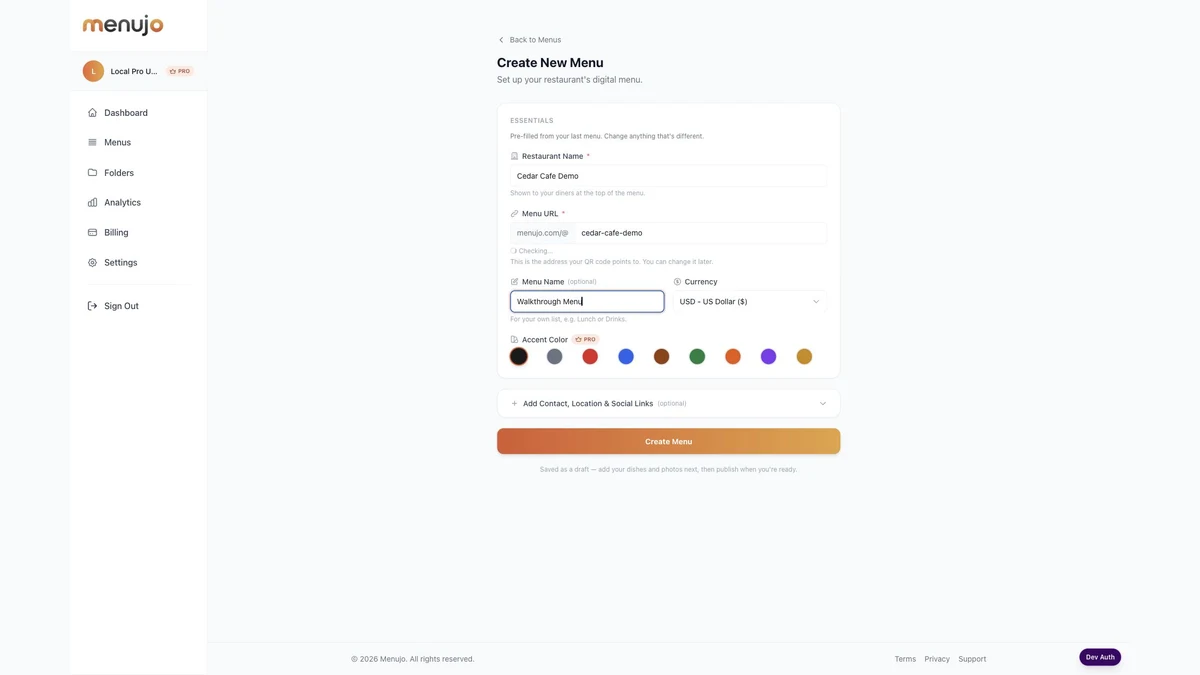
Step 1: Sign Up for a Free Menu Platform
Choose a digital menu platform that lets you create and host your menu online. Look for one that includes QR code generation, mobile optimization, and doesn't require technical skills. Menujo's free plan lets you create your first digital menu with unlimited items — no credit card required.
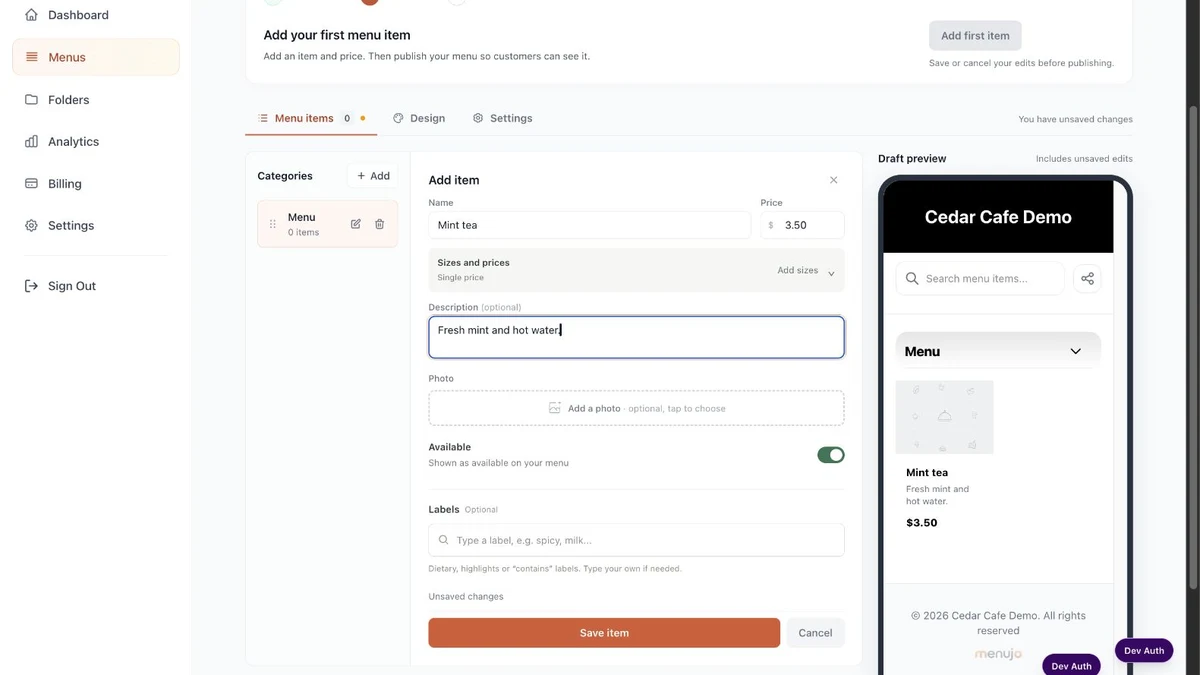
Step 2: Add Your Menu Items
Organize your menu into categories (Appetizers, Main Course, Desserts, Drinks, etc.) and add each item with:
- Item name and description
- Price (with optional size variants)
- A photo (high-quality food photos increase orders by up to 30%)
- Tags like Vegan, Spicy, Gluten-Free, or Chef's Pick
Step 3: Customize Your Design
Add your restaurant's logo, choose a color theme that matches your brand, and upload a cover image. Most platforms offer preset themes so you don't need design skills.
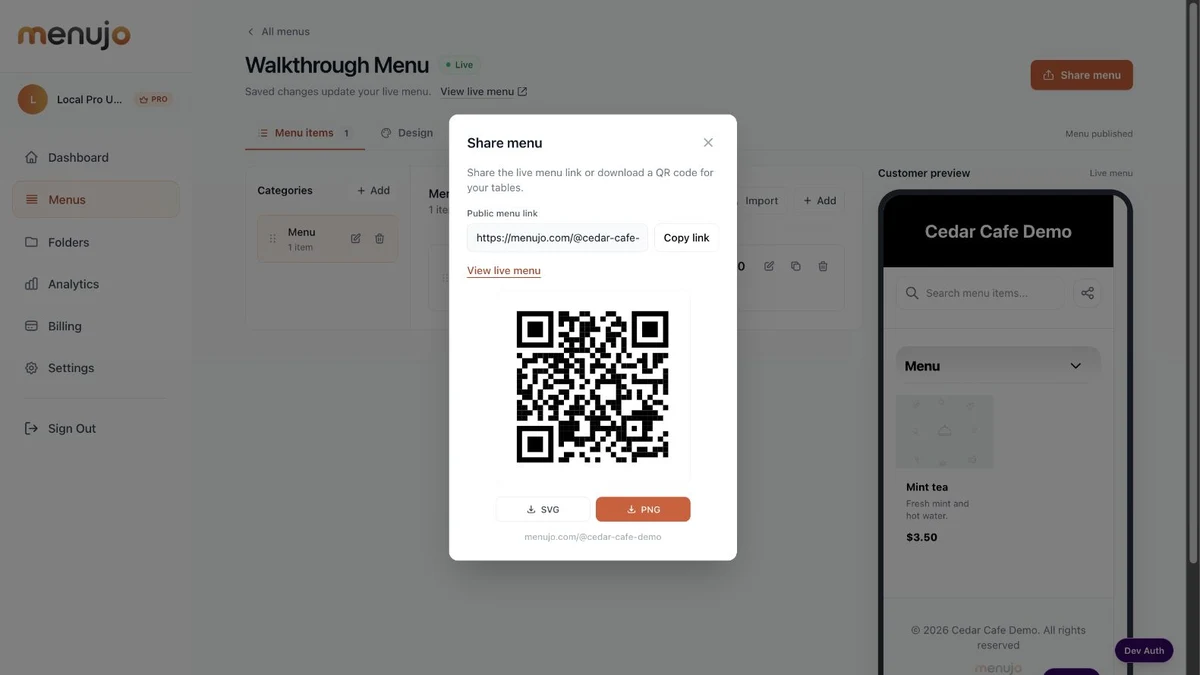
Step 4: Download Your QR Code and Print
Once your menu is published, download the QR code as a high-resolution PNG or SVG file. Print it on table cards, stickers, or tent cards and place them on every table. Customers scan with their phone camera — your menu opens instantly in their browser.
A well-designed digital menu goes beyond just listing dishes and prices. Here's what the best restaurant digital menus include:
Essential Elements
- Clear categories — Group items logically (Starters, Mains, Sides, Desserts, Drinks)
- Prices for every item — Don't make customers guess
- Short descriptions — 1–2 sentences per item highlighting key ingredients
- High-quality photos — Even a smartphone photo is better than no photo
- Dietary information — Tags for Vegan, Vegetarian, Halal, Gluten-Free, Nut-Free
Recommended Extras
- Restaurant logo and branding — Professional look builds trust
- Contact info — Phone number (tap to call), address, Google Maps link
- WiFi password — Customers love this (tap to copy)
- Social media links — Instagram, Facebook, TikTok
- Opening hours — So customers know when to visit next
Design Tips That Drive Sales
- Put your highest-margin items at the top of each category
- Use badges like "Popular" or "Chef's Pick" to guide decisions
- Keep descriptions short — customers scan, they don't read
- Use price variants (Small $5 / Large $8) to encourage upsells
The cost varies widely depending on what you need:
| Solution | Cost | Best For |
|---|---|---|
| Free platforms (Menujo, Almenu) | $0/month | Single-location restaurants, cafés, food trucks |
| Pro plans (Menujo Pro, UpMenu, MenuTiger) | $7–$50/month | Multi-location, analytics, custom branding |
| PDF-to-QR converters (QR Code Generator) | $0–$15/month | Quick setup with existing PDF menu |
| Digital menu boards (hardware + software) | $200–$2,000+ setup | QSR chains, drive-throughs |
For most independent restaurants, a free QR code menu platform is the best starting point. You get a professional digital menu without any upfront cost. Upgrade to a paid plan later if you need analytics, custom branding, or unlimited menus.
Compare that to printed menus: even a conservative estimate of $1,800/year in printing costs means a digital menu pays for itself immediately.
- Using a static PDF instead of a dynamic menu — PDF menus can't be updated without re-uploading. Use a platform that lets you edit items directly.
- Skipping photos — Menus with photos get significantly more engagement. Even smartphone photos are better than text-only listings.
- Too many items per category — Keep each category to 8–12 items. Analysis paralysis reduces orders.
- Forgetting mobile optimization — Over 90% of scans happen on phones. Your menu must look good on small screens. Avoid PDF menus — they require pinching and zooming.
- Not including dietary tags — Customers with dietary restrictions will leave if they can't filter. Tags like Vegan, Halal, and Gluten-Free are essential in 2026.
Frequently Asked Questions
How do I make a digital menu for my restaurant?
Sign up for a free digital menu platform like Menujo, add your menu items with photos and prices organized by category, customize the design with your logo and colors, then download and print the QR code for your tables. The entire process takes under 5 minutes.
Is a digital menu free?
Yes. Several platforms offer free digital menus, including Menujo (1 free menu with unlimited items), Almenu, and Yumm. Free plans typically include basic QR code generation and mobile-optimized menus. Paid plans ($7–$50/month) add features like analytics, custom branding, and unlimited menus.
What is the best app to create a restaurant menu?
The best app depends on your needs. For a free QR code menu with no technical skills required, Menujo is a strong option. For PDF-based menus, Canva offers design templates. For ordering integration, platforms like UpMenu or MenuTiger include built-in ordering. Choose based on whether you need display-only menus or ordering functionality.
How do customers scan a QR code menu?
Customers open their phone camera and point it at the QR code on the table. Most modern smartphones (iPhone and Android) automatically detect QR codes. A notification appears — they tap it, and the menu opens instantly in their web browser. No app download is needed.
Can I update my digital menu after printing the QR code?
Yes. With a dynamic QR code menu, the QR code stays the same even when you change the menu content. You can update prices, add or remove items, change photos, and mark items as sold out — all without reprinting the QR code.
How much does a digital menu cost vs a printed menu?
A basic digital menu is free. Even premium plans cost $7–$50/month ($84–$600/year). Printed menus cost $2,400–$5,000/year when you include reprints, design fees, and labor. Most restaurants save 80–100% of their menu costs by switching to digital.
Do digital menus work without internet?
The QR code itself doesn't need internet — it's printed on paper or a sticker. However, the customer's phone does need a mobile data or WiFi connection to load the menu in their browser. This is rarely an issue since most restaurants offer WiFi.
Are digital menus good for restaurants?
Yes. Digital menus reduce costs (save $2,400–$5,000/year on printing), increase revenue (15–30% higher average order value), improve hygiene (contactless), enable instant updates, and provide analytics on what customers view. 75% of restaurants worldwide now use them.
What should a digital menu include?
At minimum: item names, prices, and categories. For best results, add short descriptions, high-quality photos, dietary tags (Vegan, Halal, Gluten-Free), your restaurant logo, contact info (phone, address), WiFi password, and social media links.
Can I use a digital menu for a food truck?
Absolutely. Digital menus are ideal for food trucks because they eliminate the need for physical menu boards that take up space. Print a QR code on a sign or sticker on your truck window. Customers scan it from outside while waiting in line.
Do I need to download an app to view a digital menu?
No. Modern digital menus open directly in the customer's web browser when they scan the QR code. There is nothing to download or install. This works on all smartphones — iPhone, Android, and any device with a camera and web browser.
How do I add a digital menu to my Google Business Profile?
Once your digital menu is published and has a public URL, go to your Google Business Profile, click 'Edit profile,' then 'Menu.' Add your menu URL in the menu link field. This makes your digital menu accessible directly from Google Search and Maps results.